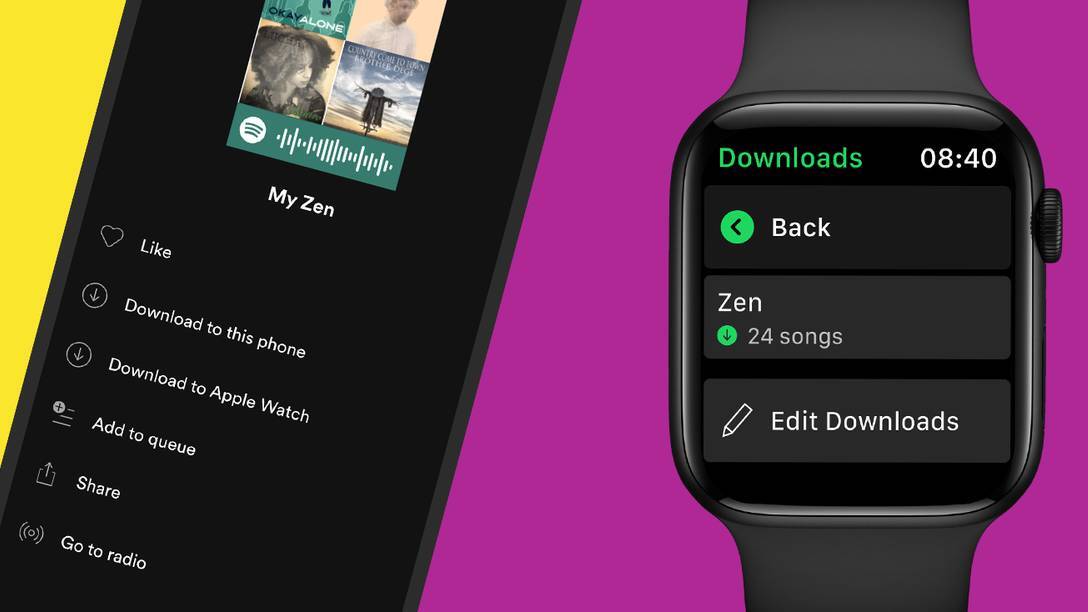
So far, Spotify users have been unable to download songs to their Apple Watch, always requiring an internet connection to play back songs. Now, requiring a premium subscription and watchOS 7 or later, Spotify will allow customers to download songs right on their wrist. Spotify already offered users this feature with Fitbit, Samsung Galaxy watches, and other smartwatches.
Spotify has provided these steps for how to download songs, playlists, albums, and more to the Apple Watch:
1. Find the music and podcasts you want to download on your watch.With offline support on the Apple Watch, users can also use Siri to play songs right from Spotify, much like on the iPhone. Spotify says that offline playback from the Apple Watch will be 96 kbps and that the functionality is rolling out to users in the coming weeks.
2 Select the playlist, album, or podcast and press the three dots (…) and choose “Download to Apple Watch.”
3. To check on the progress, head over to the Downloads section on the watch.
4. Once playlists, albums, or podcasts in your library are downloaded, you’ll see a little green arrow next to their names.
5. Connect your headphones and start listening, no matter where you are!
Tag: Spotify
This article, "Spotify Announces Downloads and Offline Playback on Apple Watch for Premium Subscribers" first appeared on MacRumors.com
Discuss this article in our forums


via MacRumors: Mac News and Rumors - All Stories https://ift.tt/3fzy0QL

No comments:
Post a Comment